📋 Introduction – Book Tickets Anytime, Anywhere
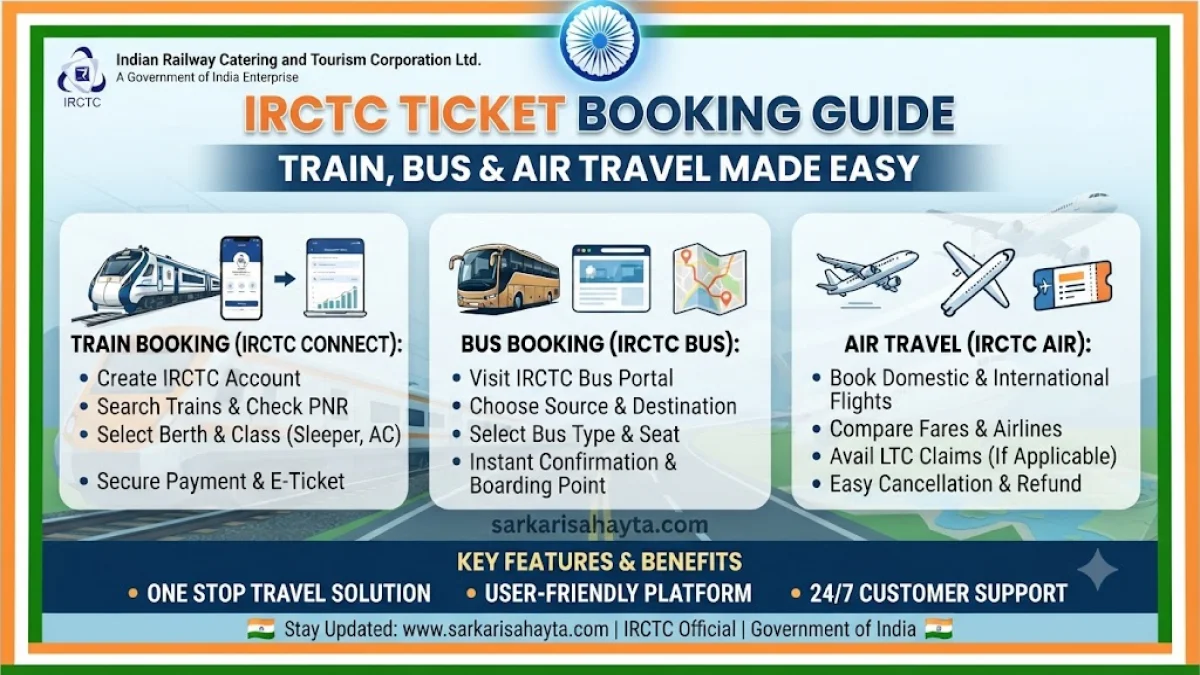
Gone are the days when you had to stand in long queues at railway stations or depend on agents for ticket booking. With IRCTC (Indian Railway Catering and Tourism Corporation), you can book train, bus, and even air tickets directly from your mobile phone or computer. This guide explains step by step how to create an IRCTC account, manage your passenger list, book Tatkal tickets, and explore other travel options without visiting the station or relying on middlemen.
📝 Step 1 – Create Your IRCTC Account
- Visit IRCTC Official Website or download the IRCTC Rail Connect App.
- Click on ‘Register’ and fill in details like Name, Date of Birth, Mobile Number, Email ID, and Address.
- Set a secure password and choose a security question.
- Verify your mobile number and email ID via OTP.
- Login with your new credentials to access the dashboard.
👥 Step 2 – Add/Modify Master List for Passengers
- After logging in, go to ‘My Profile’ → ‘Master List’.
- Add passenger details such as Name, Age, Gender, and ID proof.
- You can save multiple passengers in the Master List for faster booking.
- Modify or delete passenger details anytime before booking.
- This feature is especially useful for Tatkal bookings where time is limited.
⚡ Step 3 – Book Tatkal Train Tickets
- Login to IRCTC at 10:00 AM for AC classes or 11:00 AM for Sleeper class (one day before journey).
- Choose your source and destination stations, date of journey, and class.
- Select Tatkal quota and proceed.
- Pick passengers from your saved Master List.
- Complete payment quickly using Net Banking, UPI, Debit/Credit Card, or Wallets.
- Download your e-ticket instantly from the booking history.
🚌 Step 4 – Book Bus Tickets via IRCTC
- Go to ‘Bus Tickets’ section on IRCTC website/app.
- Enter source and destination cities, travel date, and preferred bus operator.
- Select seats and boarding/dropping points.
- Confirm passenger details and make payment.
- Download your bus e-ticket from booking history.
✈️ Step 5 – Book Air Tickets via IRCTC
- Navigate to ‘Flights’ section on IRCTC website/app.
- Enter departure and arrival airports, travel dates, and passenger count.
- Compare available flights and fares.
- Select your preferred flight and enter passenger details.
- Make payment securely and download your flight e-ticket.
⚠️ Important Tips for Smooth Booking
- ✅ Save passenger details in Master List before Tatkal booking.
- ✅ Keep payment options ready (UPI/Net Banking) for faster checkout.
- ✅ Login 5–10 minutes before Tatkal opening time.
- ✅ Always check refund and cancellation policies before booking.
❓ Frequently Asked Questions (FAQ)
- 📌 How do I create an IRCTC account?
- Visit IRCTC website, click on ‘Register’, and fill in your details. Verify via OTP to activate your account.
- ⚡ What is the timing for Tatkal ticket booking?
- Tatkal booking opens at 10:00 AM for AC classes and 11:00 AM for Sleeper class, one day before the journey.
- 👥 What is the Master List in IRCTC?
- The Master List allows you to save passenger details in advance for faster ticket booking, especially useful during Tatkal rush.
- 🚌 Can I book bus tickets on IRCTC?
- Yes, IRCTC provides bus booking services. You can select routes, operators, and seats directly from the IRCTC portal.
- ✈️ Can I book flight tickets on IRCTC?
- Yes, IRCTC also offers air ticket booking. You can compare fares and book flights directly from the IRCTC website/app.
- 📢 Do I need to visit the station for ticket booking?
- No, all bookings (train, bus, air) can be done online via IRCTC without visiting the station or relying on agents.